

What is Cross Browser Visual Testing and Why it is Important?
From my previous article, we know what is Cross browser testing and how important it is. There is one more important problem that Cross browser testing solves and that is consistent look and feel of application across browsers.
As with the growing rate of web and mobile application we have many different browsers available in the market, each with their own UI rendering engine. So, our application may render UI in a different way.
For example, if we style the scrollbar, it renders different on Google Chrome and Mozilla Firefox. So, this makes our application have different look on different browsers. It is very important for developers to handle these things across browsers. As testers, it is our responsibility to check for visual differences.
Where to start from?
To start with our visual tests, we need to compare UI on different browsers. So, what if we compare different browsers with each other.By doing this we will end up in confusion, we will not be able to figure out the right output. Here, first step to identify the ideal output on a single browser. For example, let’s assume that my application looks best on Google Chrome, and all the stakeholders approve the look and feel of the application. Now keeping Google Chrome as the Base Browser, I will compare the output of all other required browsers with my base browser. By doing this we can get rid of all the confusions.
How to test for Look and Feel?
Now we have decided on our Base browser so, how do we start comparing? The answer to this question is very simple, like how we compare to similar objects with our eyes. We need to take the screenshot of our application on the Base browser and on test Browsers. Now compare the UI of all test browsers with the Base browser.Challenge is how to automate the process. The approach is very simple, we need to think with our glasses upside down.
We know selenium, it gives us the power to automate the web apps. It has a feature that helps us to take the screenshot of our web pages. Now open the same URL using selenium on different browsers and take screenshots.
Example Code
import java.io.File;
import org.apache.commons.io.FileUtils;
import org.openqa.selenium.By;
import org.openqa.selenium.OutputType;
import org.openqa.selenium.TakesScreenshot;
import org.openqa.selenium.WebDriver;
import org.openqa.selenium.firefox.FirefoxDriver;
import org.testng.annotations.Test;

    public class ScreenShotTest{
        public WebDriver driver;

      @Test
      public void openBrowser() throws Exception {
       driver = new FirefoxDriver();
       driver.manage().window().maximize();
       driver.get("http://www.google.com");
       getscreenshot();
      }

      public void getscreenshot() throws Exception
      {
              File scrFile = ((TakesScreenshot)driver).getScreenshotAs(OutputType.FILE);

              FileUtils.copyFile(scrFile, new File("D:\\Chrome_BASE.png"));
      }
 }
Next step is to compare them, there are many open source libraries that do a pixel level comparison of 2 images and generates an image with the difference. Blink-diff is one of them. Please find the below usage of the same.
Install by the following command:
npm install blink-diff
blink-diff --output <output>.png <image1>.png <image2>.png
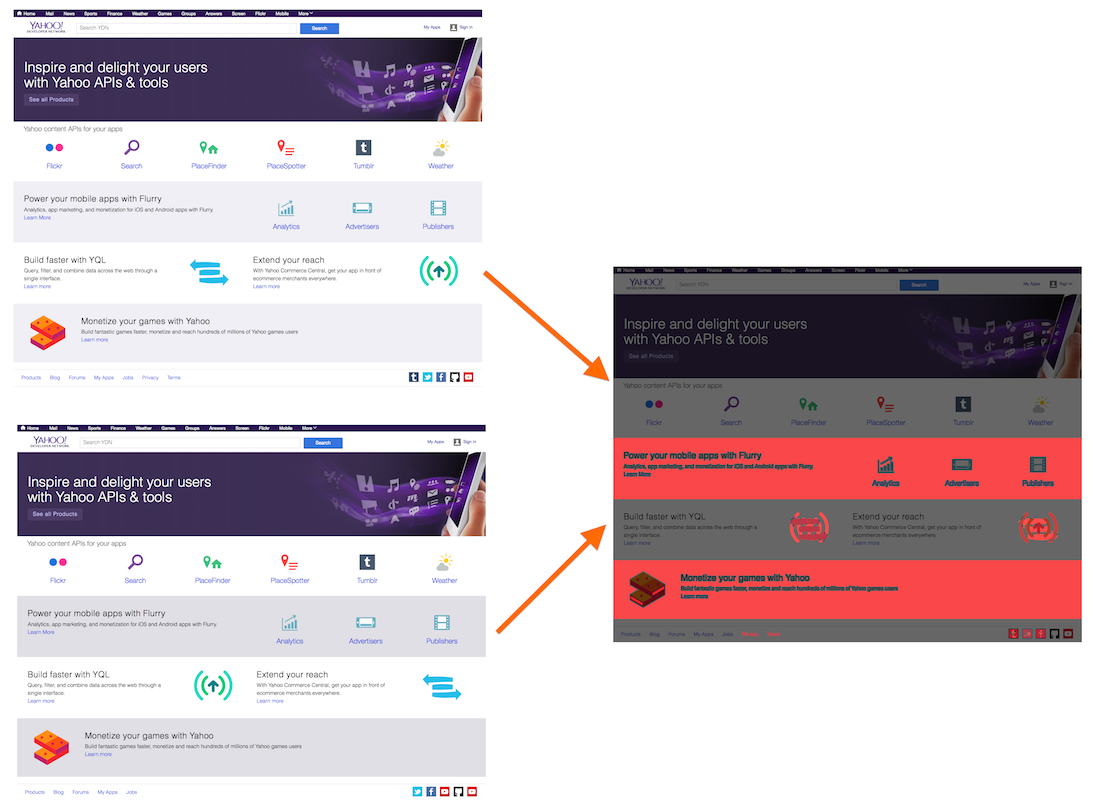
(Example of pixel level image comparision)
For more follow Blink diff.
There is a similar library for Java programmers, its called Ashot
By using one of these libraries you can get a visual difference and hence can point out the changes very easily.
This process will need some manual intervention from the tester as your application may have some carousals or advertisements which dynamic in nature and can change with time. Those changes must be ignored manually.
You can also perform these test on Cloud Service providers such as BrowserStack.
Hope by reading this article you will be able to perform Cross Browser Visual Testing.
This process will need some manual intervention from the tester as your application may have some carousals or advertisements which dynamic in nature and can change with time. Those changes must be ignored manually.
You can also perform these test on Cloud Service providers such as BrowserStack.
Hope by reading this article you will be able to perform Cross Browser Visual Testing.
Cross Browser Visual Testing
 Reviewed by Karan Sawhney
on
5:51 AM
Rating:
Reviewed by Karan Sawhney
on
5:51 AM
Rating:
Reviewed by Karan Sawhney
on
5:51 AM
Rating:

No comments: